Welcome to your one-stop guide for downloading your USDA Organic Certificate. Whether you’re renewing
your records, updating your files, or sharing proof of certification, this page walks you through the
simple steps to access your certificate directly from the Organic Integrity Database (OID).
Please note: QCS no longer issues certificates directly—clients are responsible
for downloading their own from the OID. Let’s get started
Download Your USDA Organic Certificate
Welcome to your one-stop guide for downloading your USDA Organic Certificate. Whether you’re renewing your records, updating your files, or sharing proof of certification, this page walks you through the simple steps to access your certificate directly from the Organic Integrity Database (OID).
Please note: QCS no longer issues certificates directly—clients are responsible
for downloading their own from the OID. Let’s get started
Step-by-Step Instructions
Access your official certification directly from the USDA Organic Integrity Database in just a few steps.
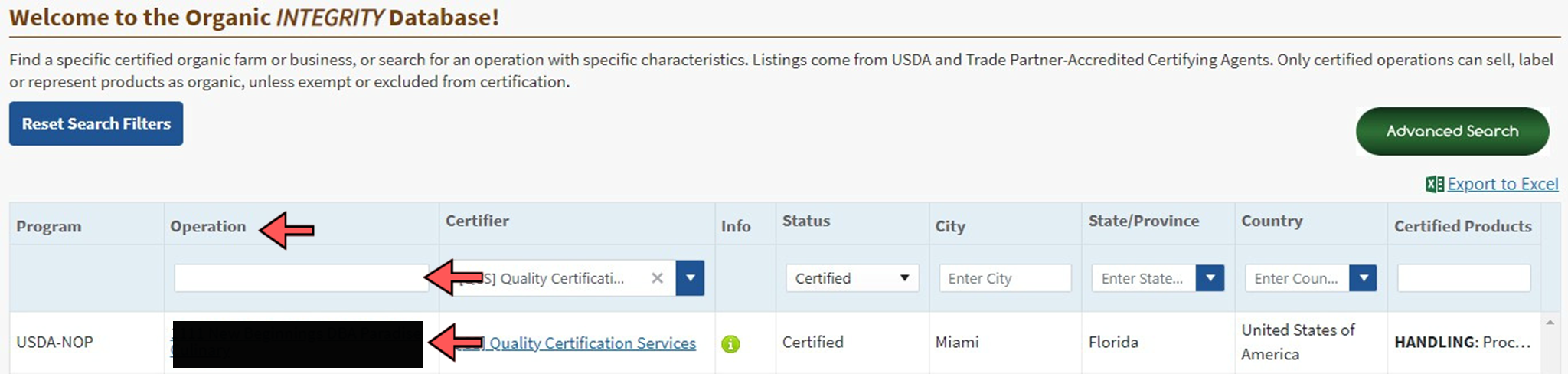
Step 2: Search for Your Operation Use the search bar in the Operation column to type your operation name, then press “enter” on your keyboard to search.
Step 3: Select Your Operation from the Results Click on the operation name that appears to open the OID profile.
Step 4: View Certificate Details On the operation’s profile page, you can view all publicly available certification details.
Step 5: View Your Certificate select Export to PDF or Print Certificate in the top right corner.
Step 6: Print/View Certificate This opens a new tab with the organic certificate. You can view, print, or save as needed.
Important Notes
QCS no longer issues certificates directly.
Clients are responsible for downloading their own certificates from the USDA Organic Integrity Database.
If you need help locating your operation, contact QCS support.
If you have any questions about getting your organic certificate, please call us at 352-377-0133 or contact your Certification Project Coordinator.